Getting Started
ABCLS is a language server and CLI for ABC music notation. It provides syntax highlighting, structural editing via selectors and transforms, transposition, harmonization, preview, and playback.
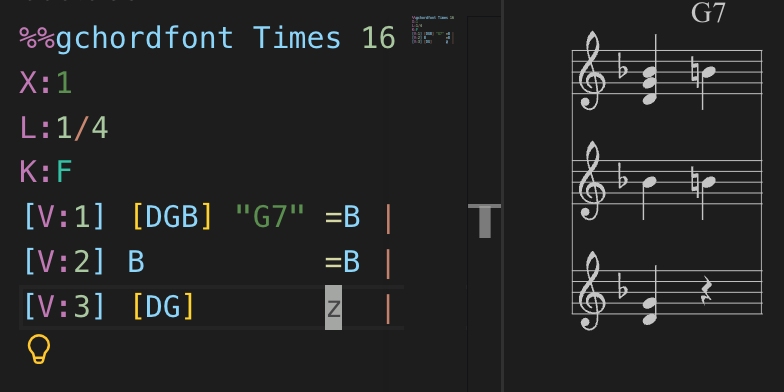
ABC notation is a markup format that allows you to go from this:
X:1ABCD |to this:

ABC notation was created by celtic folk musician Chris Walsham. Its most popular rendering library for the browser was created by Paul Rosen, and its vscode extension, which this project partially vendors, by Alen Siljak.
External resources
Section titled “External resources”- ABC Notation Basics — a quick introduction to the notation format
- The ABC notation standard (v2.2)
- The abcjs rendering library
- ABC notation tutorial
Prerequisites
Section titled “Prerequisites”- Node.js >= 22.x
Installation for VS Code
Section titled “Installation for VS Code”Search for “abcls” in the Extensions marketplace, or install from the command line:
code --install-extension antoinebalaine.abclsOpen any .abc file to activate the extension.
Installation for Kakoune
Section titled “Installation for Kakoune”Install the Kakoune plugin globally:
npm install -g abcls-kakRun the install helper to configure your kakrc:
abcls-kak-installAlternatively, add the following line to your kakrc manually:
source <path-to-global-node-modules>/abcls-kak/rc/abc.kakThe Kakoune plugin requires kak-lsp to be installed and configured.
Installation for other editors (Neovim, Emacs, Helix, etc.)
Section titled “Installation for other editors (Neovim, Emacs, Helix, etc.)”Other editors are not supported at the moment, but the project’s language server can still be used with them since it implements the language server protocol.
Install the CLI and language server globally:
npm install -g abclsConfigure your editor’s LSP client to use the following server command:
abcls lsp --stdioUse the following settings:
- Language ID:
abc - File extensions:
.abc,.abcx
Verification
Section titled “Verification”Open a .abc file in your editor and check that syntax highlighting is active. Try running a transform (e.g. transposition) or format the file from the CLI:
abcls format myfile.abc